How to Write Prompts for Nano Banana: 10 Tips for Creators
This is the technique guide. If you want the catalog of what's already in the gallery, see [The Curify Nano Banana Prompt Library: 4,000+ Tested Image Prompts](/blog/nano-banana-prompt-ecosystem) — that post walks the library by mood, subject, style, lighting, and season. What you'll get here instead: 10 concrete principles for actually writing a prompt that lands on the first or second generation, with worked examples for each. Skim the bold lines, copy what fits, modify for your use case.
What Is Nano Banana?
- `gemini-2.5-flash-image` — fast, lower-cost, the everyday workhorse
- `gemini-3-pro-image-preview` — slower, higher fidelity, better at fine detail and text rendering
What makes Nano Banana different from Midjourney / DALL·E:
- Native multi-turn editing. Keep the subject the same and change only the lighting / pose / background in the next turn. Other models usually force you to rewrite the prompt from scratch.
- Strong text rendering. Posters, infographics, and signage with readable text are within reach.
- Tight prompt adherence. Specific colors, named camera bodies, and aspect ratios are usually honored.
1. Anchor the Subject First, Style Second
Concrete subject signals to include:
- Species or role: "a red panda", "an elderly Tibetan monk"
- Action or pose: "standing on a moss-covered log", "mid-stride at sunrise"
- Setting: "in a Himalayan rhododendron forest"
- Eye contact / framing: "centered, eye contact with camera"
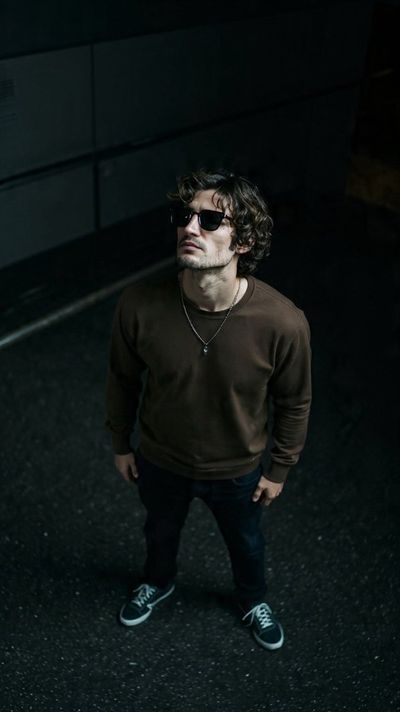
> Create an urban scene with a young man standing on dark asphalt, looking upwards into a dimly lit industrial backdrop. The subject should be in casual attire with a focused expression, set against a dark background that includes a vent and railings.
Why this lands: The first noun phrase — young man standing on dark asphalt — is the subject. The style language (urban, industrial, dimly lit) comes after. Strip the style and you still know what's being rendered; that's the test of a subject-first prompt.
2. Use Lens and Camera Language
- Focal length: 24mm (wide environmental), 35mm (documentary), 50mm (natural), 85mm (portrait), 135mm (compressed), macro
- Depth: shallow depth of field, deep focus, bokeh background
- Angle: top-down (flat-lay), eye-level, low angle (heroic), Dutch tilt (unease)
- Format: shot on Fujifilm Pro 400H, Kodak Portra 400, 35mm film grain
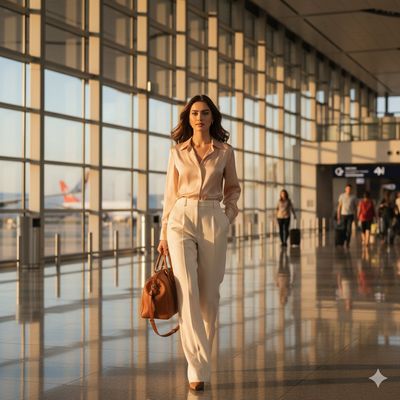
> A poised traveler, dressed in a chic blazer and trousers, strides confidently through an airport terminal during the golden hour. The sunlight filters in from the windows, casting a warm glow on her face and creating beautiful highlights that accentuate her features.
Why this lands: Even without an explicit focal length, the language highlights that accentuate her features + warm glow on her face puts Nano Banana in portrait-lens mode — shallow depth, soft compression. The next iteration would just add `shot on 85mm` to lock it in.
3. Name Your Lighting
- Time-of-day: golden hour, blue hour, harsh midday, overcast, twilight
- Quality: hard light, soft diffused light, dappled light (through leaves), high-contrast
- Direction: rim light from behind, side light from camera left, top-down (god rays)
- Studio language: softbox, key light, fill light, Rembrandt lighting, butterfly lighting
> A poised traveler strides through an airport terminal during the golden hour. The sunlight filters in from the windows, casting a warm glow on her face and creating beautiful highlights that accentuate her features.
Why this lands: Lighting line is doing 80% of the aesthetic work here. Replace golden hour with fluorescent overhead lighting and the same composition reads as a stock airport shot. The lighting modifier is the highest-leverage knob.
4. Pick One Style Modifier — and Commit
- Cinematic photography: anamorphic, color graded, filmic contrast
- Watercolor: loose brush strokes, paper texture, soft edges, no outlines
- Vintage editorial: 1970s magazine, muted earth tones, grain
- Isometric illustration: clean vectors, 30° angle, soft shadows
- Anime cel-shaded: bold outlines, flat color regions, highlight on hair
- Ink wash: brushwork, negative space, monochrome plus one accent color
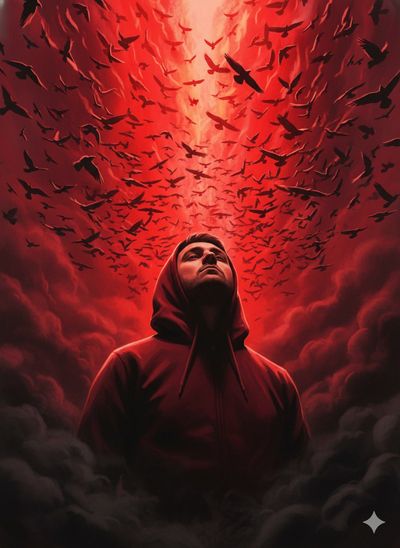
> A person in a vibrant red hoodie stands confidently against a backdrop of swirling shadows, their gaze directed towards the sky as a chaotic flock of black birds takes flight in an explosion of fiery red and orange hues. The scene is set against a dramatic contrast between the dark shadowy background and the explosive bursts of color.
Why this lands: One style commitment: dramatic, swirling, chaotic, explosive. Every modifier reinforces the same energy. The prompt would collapse if you added watercolor or isometric — pick one mood and double down on its vocabulary.
5. Compose Deliberately
- Rule of thirds, subject on the right third
- Centered with negative space above (good for adding text)
- Leading lines from bottom-left to upper-right
- Subject in the lower-left, environment fills the rest
- Symmetrical composition, subject centered, mirrored elements
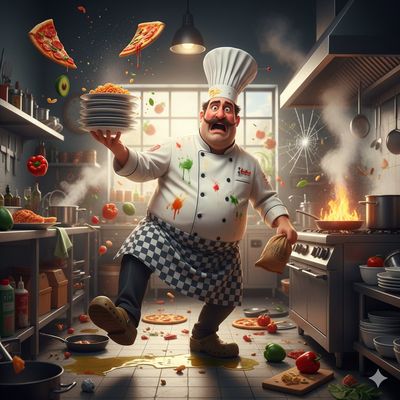
> A chaotic cooking scene in a kitchen setting. The main focus is on a clumsy chef who has dropped ingredients onto the floor and scattered food items all around him, creating an exaggerated mess. He is holding a tray with multiple pizzas that are falling.
Why this lands: Composition is explicit: main focus on clumsy chef, food items all around him, pizzas that are falling. Three sentences each name a different spatial element. Without these, Nano Banana defaults to a centered subject with an empty background.
6. Specify a Color Palette
1. Name a palette: "muted earth tones", "high-contrast neon", "pastel ice cream", "corporate blue + grey"
2. Provide hex values: "dominant color #c47957, accents #a3b29b and #f4e9d6"
3. Reference an aesthetic: "Wes Anderson palette", "early Pixar 2D color script"
Add a negative for what to suppress: "no oversaturated blues, no neon greens."
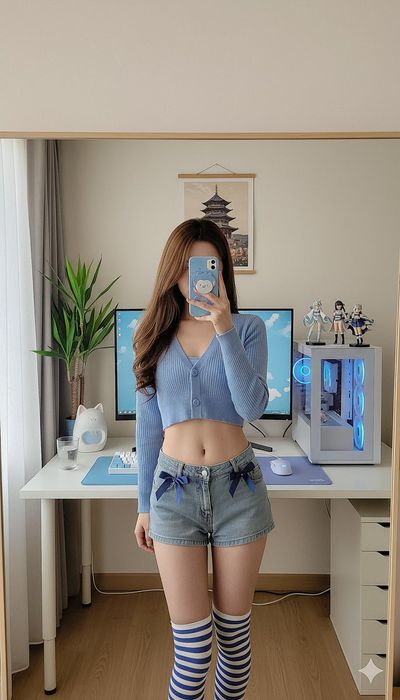
> A person standing in front of a room with a desk, computer monitor, keyboard, and chair that has a blue and white color scheme. The individual is wearing a sky blue top with a white logo, denim shorts, and striped socks. There's also a small plant on the desk.
Why this lands: Color is named explicitly four times — blue and white color scheme, sky blue top, white logo, denim shorts. Nano Banana respects the palette because there's nothing to interpret. Strip the color names and you'd get a randomized palette every generation.
7. Pin the Aspect Ratio
- 1:1 — Instagram square, LinkedIn feed
- 4:5 — Instagram portrait (the highest-engagement IG ratio)
- 9:16 — TikTok, Reels, Shorts, Stories
- 16:9 — YouTube thumbnail, blog hero
- 3:2 / 2:3 — DSLR landscape / Pinterest portrait
- A4 / 210x297 — printable poster, infographic
When in doubt, also tell the model what fits where in the frame — "subject occupies the lower two-thirds, with sky negative space above for caption text."
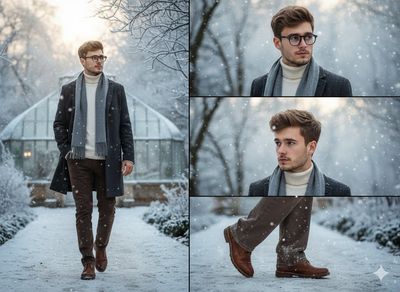
> A young man with glasses, dressed in a sweater and coat, stands alone on a snowy pathway, admiring the winter landscape. The scene captures the tranquility of a frost-covered botanical garden under a soft, pale sky. The image is presented in a vertical format with high resolution.
Why this lands: Aspect ratio called out explicitly — vertical format. Without that line, Nano Banana defaults to a horizontal landscape composition and the snowy pathway depth-of-field disappears. One sentence; one line of control.
8. Use Negative Prompts Surgically
- Hands: "no extra fingers, no fused fingers, hands fully visible"
- Text: "no text or watermarks, no captions overlaid on the image"
- Style drift: "no cartoon style, photorealistic only"
- Distortion: "no fisheye distortion, no warped faces near the frame edge"
- Composition: "no subject cropped at the eyes or chin"
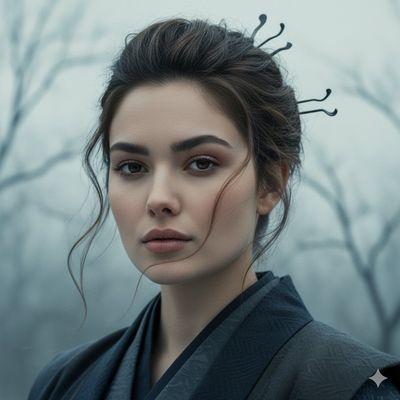
> A contemplative samurai embodying serenity and resilience during a cold winter day. The subject is a woman dressed in traditional samurai attire, her armor lightly dusted with snow. Composed and serene posture against a snow-blanketed landscape.
The targeted negatives you'd add for this prompt: no extra fingers or distorted hands gripping the sword, no blurred or asymmetric eyes, no anachronistic modern elements in the background. Specific failure modes you've actually seen in your last two generations — not cargo-cult negatives copied from a Midjourney guide.
9. Iterate in Multi-Turn — Nano Banana's Killer Feature
Typical iteration patterns:
- Lock subject, vary lighting: "same character, change the lighting to overcast morning instead of golden hour"
- Lock style, vary scene: "keep the watercolor style and the character, move them to a snow-covered cabin"
- Lock everything, add one element: "same image, add a black cat sitting on the windowsill"
- Generate variants: "three variations of this image, each with a different background color"
Don't try to land everything in turn 1. Sketch broadly, then refine.
Real example from the gallery: /nano-banana-pro-prompts/4170 (tagged golden hour · photorealistic).
> A poised traveler in a chic blazer and trousers strides confidently through an airport terminal during the golden hour. The sunlight filters in from the windows, casting a warm glow on her face.
Iteration patterns from this base:
- Turn 2 — "same subject, same composition, but change the time of day to late blue hour. Replace the warm window light with cool overhead fluorescents."
- Turn 3 — "same lighting as turn 2, but change her outfit to a winter coat and add a small carry-on suitcase."
- Turn 4 — "same outfit and subject, but switch the location to a snowy parking lot outside the terminal."
The subject identity (her face, hair, body) stays locked across all four turns because Gemini reuses the base seed. Re-prompting from scratch would drift the face every time.
10. Start From a Gallery Prompt, Not a Blank Page
The workflow that works:
1. Search by tag for the closest aesthetic. Filter /nano-banana-pro-prompts by the dominant tag — mood (playful, serene, dramatic), subject (portrait, woman), or style (photorealistic, illustration, vintage). The Library post above lists the most-populated tag clusters.
2. Pick the example whose image is closest to what you want — not whose prompt text looks similar. The image tells you what Nano Banana actually produced; the prompt is just the input.
3. Copy the prompt, swap the subject, keep the technique stack. The lens, lighting, palette, composition language stays — only the subject noun changes.
This skips 80% of the failure modes from writing a prompt cold.
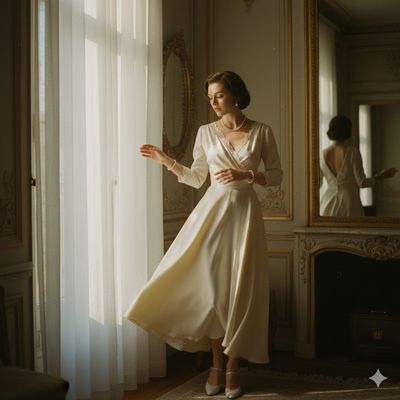
> Elegant 1950s portrait of a woman in a flowing silk dress, poised at a window with gentle, soft light creating a dreamy atmosphere. The subject is wearing jewelry and her hair is styled in a vintage manner. She is looking out of the window onto the street. The background features a vintage mirror reflecting the warm interior tones.
Look at the technique stack: subject (1950s woman portrait) → action (poised at window, looking out) → setting (flowing silk dress, vintage interior) → lighting (gentle, soft light, dreamy atmosphere) → style (vintage, warm interior tones).
To produce a 1920s flapper version, you keep the entire technique stack and swap the subject decade: "Elegant 1920s flapper portrait of a woman in a sequined fringe dress, poised at a window with gentle, soft light creating a dreamy atmosphere…" Same scaffolding, different decade. Two minutes from gallery browse to live generation.
Where Nano Banana Is Available
- Google AI Studio (aistudio.google.com) — free interactive playground; best for one-off exploration
- Gemini API — programmatic access, pay-per-image (`gemini-2.5-flash-image` and `gemini-3-pro-image-preview`)
- Vertex AI — enterprise tier with regional deployment and compliance controls
Wrapped access (UX optimized for non-engineers):
- Curify — template-based UX on top of the Gemini image API; you fill in subject parameters, Curify constructs the full prompt
- Consumer Gemini app — image generation as part of the general Gemini chat experience
If you're writing prompts directly (this article's audience), Google AI Studio is the cheapest place to iterate. If you're producing a series of consistent images, Curify is the lower-effort path.
Where to find prompts that already work
- Subject-led: when you know what you want to render. Filter by portrait, woman, man, selfie, then pick the example whose aesthetic is closest.
- Aesthetic-led: when you have a feel but not a specific subject. Filter by playful, serene, cozy, dramatic, vintage. The mood and style tag clusters are populated in the thousands.
The Order That Works
1. Subject (specific, named) →
2. Action / pose →
3. Setting →
4. Lens / shot type →
5. Lighting →
6. Style modifier (one) →
7. Color palette →
8. Aspect ratio →
9. Negative prompts (specific, targeted) →
10. Iterate in multi-turn
Memorize the order. Once it's habit, you'll write better prompts in 30 seconds than most people write in 5 minutes of fiddling.
And when you don't want to write at all — grab a working prompt from the gallery and swap the subject. The technique stack is already tested; you only need to change the noun.
Frequently Asked Questions
Take the next step
Putting what you read into practice.
Related Articles
Nano Templates
Ultimate Directory of Nano Banana Prompts
The Curify Nano Banana Prompt Library: 4,000+ Tested Image Prompts