AI Makeover Templates: 4 Patterns from Selfie to Style Transformation
*AI makeover* searches grew to 210/month at KD 19 — a green-on-green opportunity signaling real consumer demand for the upload-your-photo transformation pattern. The trick is that "makeover" is broad: it covers fashion styling, portrait retouching, virtual outfit try-on, AND artistic transformation depending on user intent. Curify ships four image-to-image template families that each cover one of those intents. **You upload your photo. The template handles the transformation.** Whether you're trying a new wardrobe, polishing a LinkedIn portrait, modeling streetwear, or commissioning an abstract art print of yourself — same upload workflow, four different output patterns. This guide walks each pattern with worked examples + the prompt phrases that move the dial.
What "AI makeover" actually means in 2026
AI makeover = image-to-image generation where the input is YOUR photo (a selfie, full-body shot, or LinkedIn headshot) and the output is your same face/figure rendered in a new style, outfit, retouch level, or artistic medium. The reference-image flow is what separates this from text-to-image (where you describe a generic person).
Underneath, every AI makeover relies on the model's ability to preserve facial structure / body proportions / identity while changing surface attributes (clothing, hair, skin retouching, art style). The template's job is to encode *which* attributes to preserve and *which* to transform.
Four broad makeover patterns dominate consumer + creator demand:
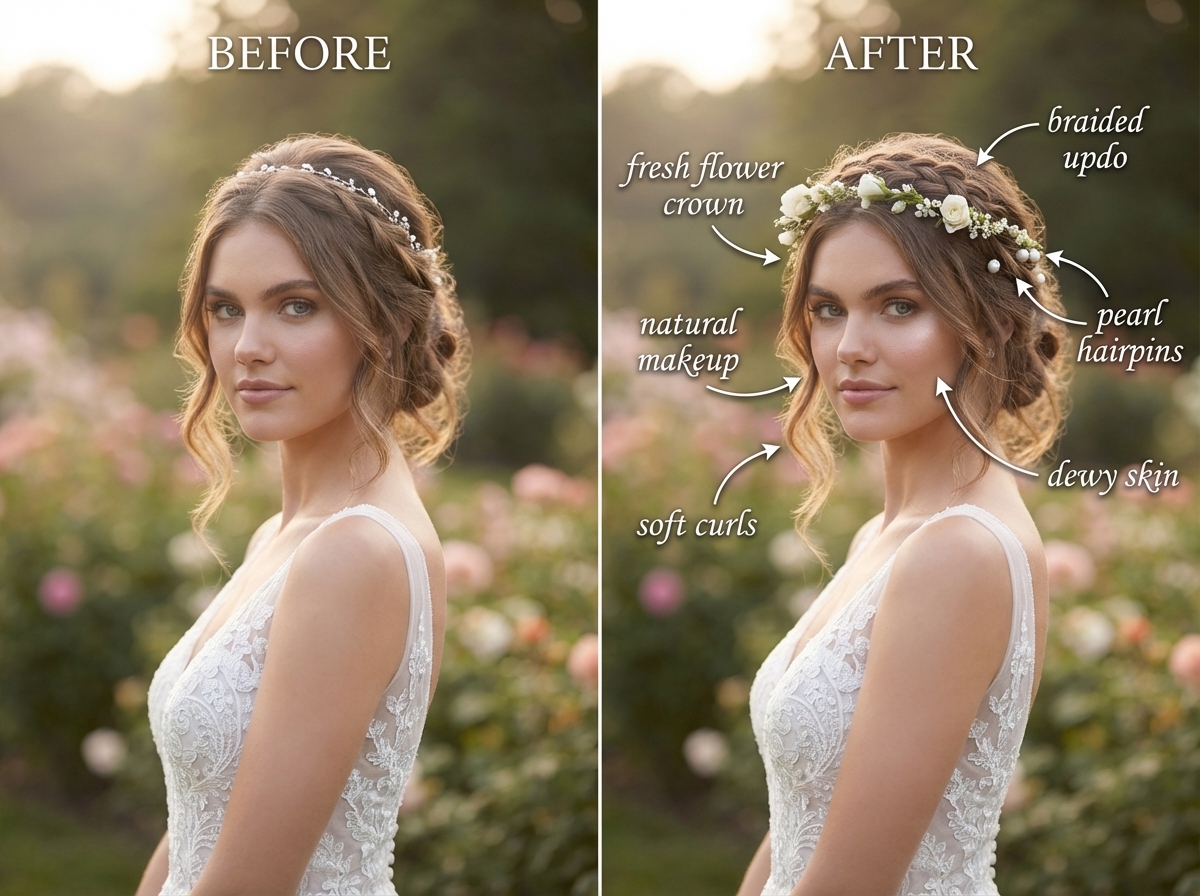
1. Portrait retouching — clean skin, polish lighting, professional headshot (LinkedIn / dating / corporate).
2. Outfit annotation card — your current outfit broken down into a styling-guide infographic with annotated callouts.
3. Virtual outfit try-on — your face/body in a new outfit (streetwear, prep, summer, casual variations).
4. Abstract portrait series — your figure rendered as Bauhaus, Mondrian, Kandinsky, or other art-movement abstract styles.
All four flow through Curify's image-to-image pipeline: upload → pick template → 5-30 second render → save / share.
Four AI makeover patterns from one selfie
Pattern 1: Portrait retouching — the LinkedIn upgrade
The most-used pattern: upload a casual selfie, get back a polished professional portrait. The template handles three transformations simultaneously — skin retouching (preserving pores, removing blemishes), color grading (warm professional tone), background swap (clean studio gray or environmental).
The distinction that matters: good portrait retouching preserves skin texture. Bad AI retouching produces porcelain-doll airbrushing that screams "AI-generated" on first glance. The Curify template explicitly preserves pores + subtle texture while removing temporary blemishes.
Open the Portrait Retouching Blueprint template →
Use case map: new job hunt portrait, dating-profile upgrade, conference speaker bio photo, executive bio refresh after a haircut/glasses change. Render time: 8-12 seconds per output. Most users iterate 3-5 outputs to pick the winning shot.
Pattern 2: Outfit annotation card — magazine-style styling guide
Upload a current outfit. Get back a magazine-style annotated styling guide: before-after split, color palette swatch, garment-by-garment annotations ("silk crepe wrap dress, midi length, soft draping"), styling tips. The template reads like the styling-guide page in *The Cut* or *Vogue Runway*.
Open the Fashion Outfit Annotation template →
Why this format works: the annotation layer adds editorial weight to a personal-style post that would otherwise read as just-another-mirror-selfie. Stylists, fashion creators, and capsule-wardrobe planners use this pattern to differentiate their content.
Use case map: Instagram fashion creator weekly post format, capsule-wardrobe planning (4-7 outfit cards for a season), bridal styling consults (bridal hairstyle + accessory breakdown), corporate wardrobe planning.
Pattern 3: Outfit try-on poster — see yourself in a new fit
The classic "virtual try-on" pattern — but rendered as a polished poster composition rather than a clinical e-commerce fit-room shot. Upload your photo, pick a style direction (casual streetwear / classic prep / cozy summer / professional), get a single-image poster of yourself in the new outfit.
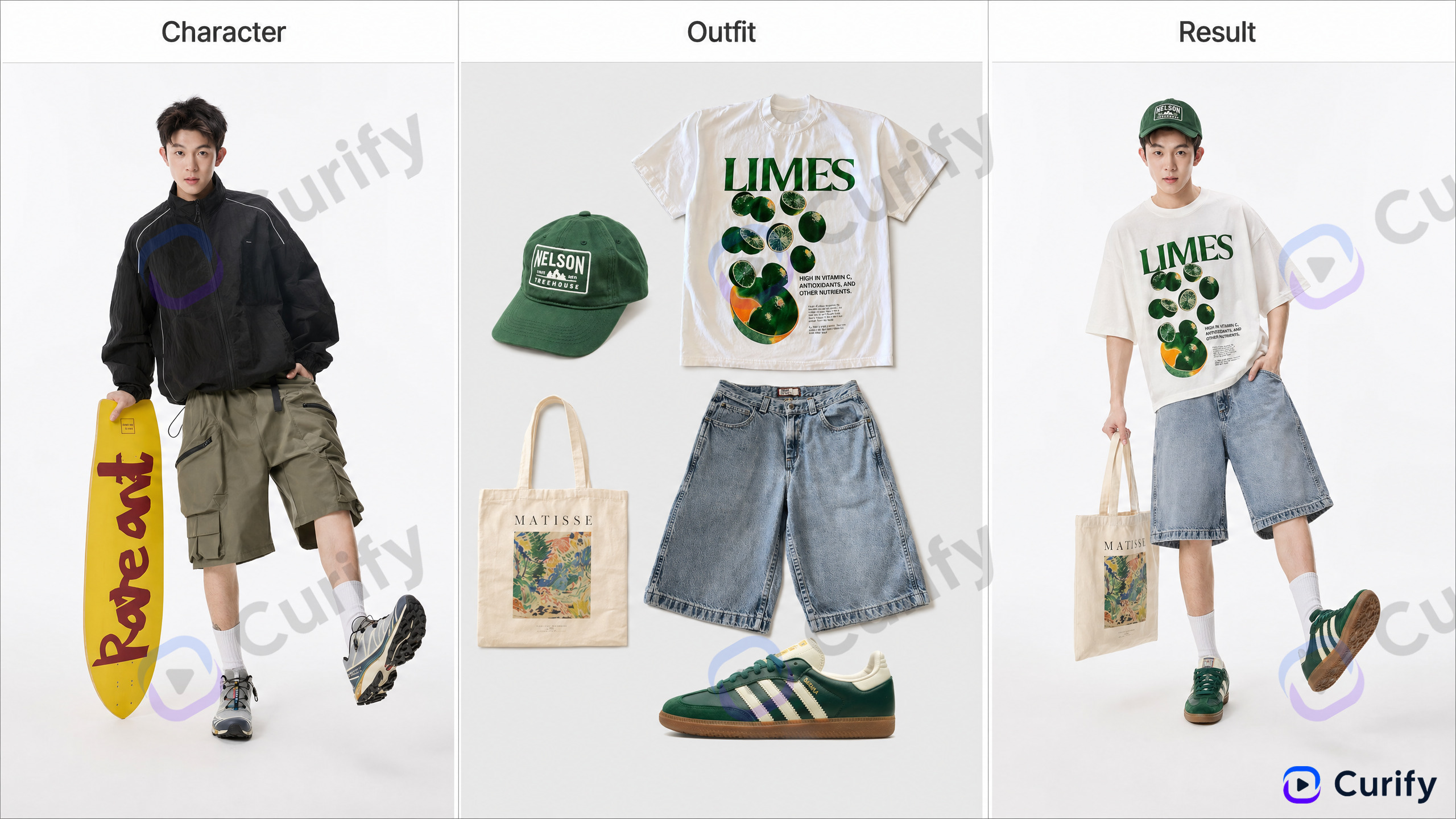
Open the AI Outfit Try-On Poster template →
Why poster composition vs. fit-room: the fit-room aesthetic reads as e-commerce product photography (low-perceived-value, transactional). The poster composition reads as editorial — stylized lighting, intentional pose, deck-ready output. Same try-on workflow, premium output framing.
Use case map: before-purchase visualization (Shop for clothes, see yourself in them before buying), seasonal wardrobe planning, partner-gift visualization ("what would these jeans look like on him?"), capsule-wardrobe try-before-buy.
Pattern 4: Figure to abstract portrait series — art-print commission style
The premium output tier: your figure rendered in a specific art movement's visual language — Bauhaus geometric reduction, Mondrian primary-color grid, Kandinsky abstract expressionism. The output reads as an *intentional art commission*, not a filter applied.
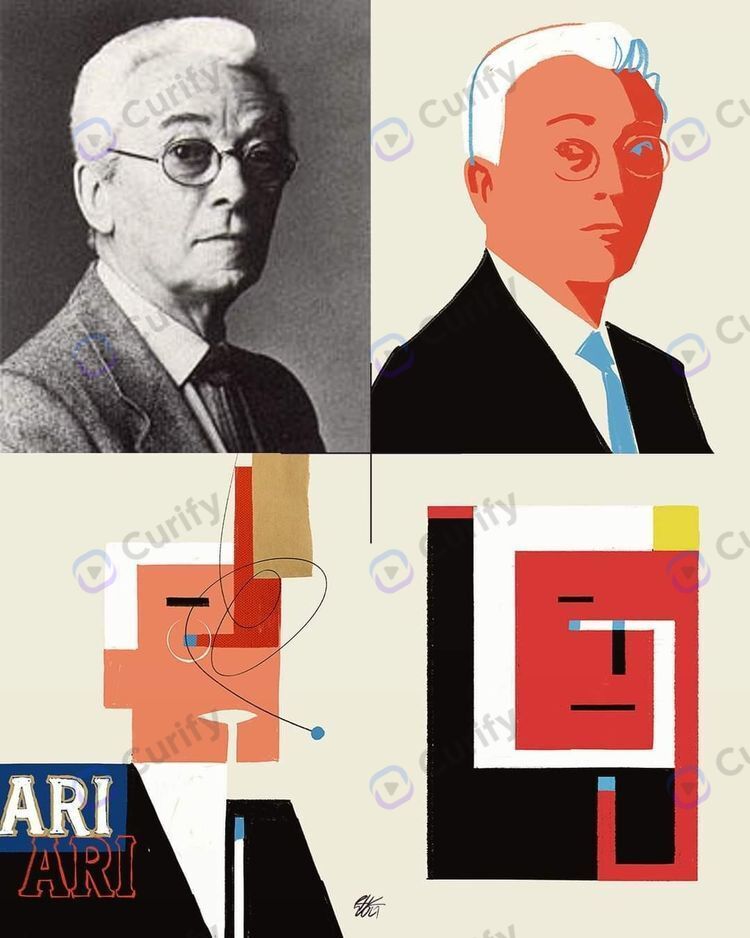
Open the Abstract Portrait Series template →
Why art-movement-specific (vs. generic "artistic style") matters: a generic AI artistic filter produces output that looks like a filter. Naming a specific art movement (Bauhaus, Mondrian, Kandinsky, Mondrian primary grid, Constructivist poster) forces the model to commit to a *visual language* with internal consistency.
Use case map: premium social media profile pics (most premium consumer tier — "I commissioned a Bauhaus portrait of myself"), gift portraiture (commissioned art print of partner / kid / parent), wedding portrait alternative, gallery-show personal-art-piece commissions.
Makeover prompt phrases that move the dial
Preserving identity (most important): *"preserve facial structure, eye shape, smile, identifiable features"* (without it, the model drifts toward a stock face). *"keep skin tone, ethnicity, age"* (locks demographic anchors). *"do not add glasses, do not change hair length"* (locks accessory anchors).
Direction-specific transformation: *"professional headshot lighting, soft key light camera-left, clean studio gray"* for portrait retouching. *"editorial fashion magazine styling, soft natural light, casual streetwear in muted earth tones"* for try-on. *"Bauhaus geometric portrait, reduced to primary forms"* for abstract series.
Pitfalls to avoid: *"AI makeover"* in the prompt itself produces low-quality output (model treats it as the goal, over-airbrushing). Always describe in *direction* terms ("professional polish" / "editorial styling" / specific art movement). Also avoid *"glow up"* / *"upgrade"* — produces porcelain skin and aggressive contouring. Use specific descriptors ("clean skin with preserved texture, color-graded warm tone") instead.
Where AI makeover still needs a human
Identity drift. Across 5-10 iterations, the model can drift further from the original face — subtle jawline shift, eye-color change, even ethnic feature shift. Always compare output to source before saving. Re-run with explicit identity-preservation prompts if drift is visible.
Skin texture vs. airbrushing. Default AI retouching airbrushes to porcelain smoothness — reads as artificial. Always specify *"preserve pores and skin texture, retouch only blemishes"*.
Outfit try-on ≠ fit/sizing. A render shows what the *style* looks like, not how it'll *fit* your specific body. Useful for style direction, not a substitute for ordering with returns on high-cost items.
Cultural / ethnic representation gaps. Models still underperform on certain features (Indigenous facial structure, specific African / Polynesian features, age 70+). If output drifts toward a generic Western face, iterate with explicit ethnic-anchor prompts.
Abstract art recognizability. Figure-to-abstract can render so abstractly that source identity is unrecognizable. For gift commissions, ensure the recipient can identify themselves before sending.
AI makeover tools compared
Curify — template-based image-to-image. 4 template families cover dominant makeover intents (portrait retouch / outfit annotation / try-on / abstract art). Best for consistent output across multiple sessions where templates lock the visual language.
Consumer AI selfie apps (Lensa, FaceApp, Remini) — fast + consumer-friendly, but variable quality. Strong for one-off filters, weaker for repeated-use cases.
MidJourney / Stable Diffusion — beautiful images but requires careful reference-image setup + ControlNet workflows to preserve identity. High ceiling, high floor.
Photoshop + Generative Fill — best when starting from an existing portrait that needs targeted retouching, not full-style transformation.
For the dominant consumer makeover use case (upload selfie → 4 directional polished outputs), template-based generation wins on speed + consistency.
Three paths for makeover users
Path A — Consumer self-service. Anyone with a selfie + makeover intent. Use the 4 templates via /nano-template — best for personal portrait polish, weekly outfit content, gift commissions, art-print purchases.
Path B — Creator pro tier. Fashion creators, stylists, lookbook producers shipping 20+ posts/month. Pro tier unlocks higher-res output, batch upload (10-50 photos at once), consistent character styling across a series.
Path C — DTC brand integration. Fashion DTC brands building virtual try-on into e-commerce. Curify integrates as API + custom-template authoring so brand products appear as the try-on options. See /use-cases/for-dtc-brands.
For the broader fashion / virtual try-on space, the upcoming Virtual Outfit Try-On Guide covers the dedicated workflow.
Ship your first makeover output today
Pick the makeover intent you actually have — professional portrait polish? Weekly outfit content? Gift commission? Art print? — and run the matching template with your best selfie. 5-15 minutes from upload to usable output. Most users find their best output in 3-5 iterations.
Reach out via /contact for creator pro tier or DTC brand integration.
Popular Template Examples
Explore our most popular Nano Banana prompt templates to see what's possible:
Take the next step
Putting what you read into practice.
Related Articles
AI Strategy
AI Packaging Design: From Brief to Mockup Set in 30 Minutes
AI Sticker Design Guide: From Mascot to Mockup in 10 Minutes